Wednesday, 14 September 2016

Configuring Transaction in Composite

Test Case: There are two table , one is Master and other is Child has primary/foreign key relationship. By a BPEL process we’ll insert the data into Master table and with other BPEL we’ll insert the data into Child in a same composite. But if any error occur while inserting the data into Child it will rollback all transactions in Master table as well.
Solution:Here I’ll use Dept and Emp table as Master and Child table.1st I’ll insert data into Dept and within same global transaction will insert data into Emp. After inserting the data into Emp I’ll throw rollback fault from BPEL and it will automatically rollback the insertion of Dept table data.Here is my composite,
image
The insertDeptBPEL is synchronous one,
image
The insertChildBPEL is synchronous one also,
image
Here in the throw activity,
image
Now the designing is complete, we need to define the transactional properties now in composite.xml like below,
<component name="insertDeptBPEL" version="1.1">
    <implementation.bpel src="insertDeptBPEL.bpel"/>
    <property name="bpel.config.transaction" many="false" type="xs:string">requiresNew</property>
    <property name="onewayDeliveryPolicy">sync</property>
  </component>
  <component name="insertChildBPEL" version="1.1">
    <implementation.bpel src="insertChildBPEL.bpel"/>
    <property name="bpel.config.transaction" many="false" type="xs:string">required</property>  </component>
Then deploy the run the composite , data will not be inserted in either of the table as it will execute rollback from the code.

String to Date Conversion in XSLT

This blog might be handy for you for quick date conversion from string to date. Like in our source is String DD-MON-YYYY format and I want to convert it to YYYY-MM-DD for making the JCA adapter recognize the same during updation in oracle table.I didn’t find out any in built function is available so I decided to use simple sql query in xslt.
image
I just used query-database function and sql query is constructed using string concatenation.
image
and if you look at the database function ,
image
and whole sqlquery is concat("select to_char(to_date('",/ns0:arrivalDate,"','DD-MON-YYYY'),'YYYY-MM-DD') arrivalDate from dual")
handy for me as well for future reference.

Communicate Between 2 Weblogic domains using SAF

I seen there are lots of material available in internet on implementation of Store And Forward JMS mechanism between two weblogic domains. Here in this blog I’ll repeat the same thing in simpler steps.
Configuration
1. First you need to have 2 weblogic domain up and running , for my case those two domains running on same machine.
2.For both of the domain go to domain name –>security from weblogic admin console .
image
Select cross domain security enabled and enter credentials and confirm credentials , for my case I’ve given welcome1.It might ask you to restart the server , please do the same.
3. Now assume you are producing one message in JMS queue of domain1 and same should be available to JMS queue of domain2. So in domain1 create a file based persistence store , give physical directory location and target the same to either admin or any managed server. For my case I targeted to SOA managed server.
image
4. Create a new JMS server say TestJMSServer and point to the persistence store that you created earlier
image
5.Create a new JMS module say TestJMSModule and create a new subdeployment say TestSubDeployment which point to TestJMSServer .So whatever the resource will be created under this module will be targeted to TestSundeployment.
image


Here is my Subdeployment tab,
image
6.So now in domain1 we’ll create a TestLocalQ where the message will be produced.So add a queue resource type under TestJMSModule and give a JNDI, I’ve given jms/b2b/TestLocalQ, but it can be any unique thing.
image
7.Then create RemoteSAFContext resource under the same module and give the URL of domain2 like below,
image


The port in the URL may vary depends on where your remote queue deployed, it might be remote admin server as well instead of any managed one.Give the remote weblogic username and password.
8.Now Create a SAFErrorHandling resource under the same module like below,
image
9.Then create SAFImportedDestinations resource and select remote saf context and saf error handling from the dropdown that you have created in earlier steps. Give some prefix for JNDI prefix , it will be useful at later stage.
image
10. Go to the Queue tab of TestSAFImportedDestinations  and create a new SAF queue.Here it will ask for JNDI of local and remote queue . At step 6 we created a local queue with JNDI jms/b2b/TestLocalQ . Similarly create a queue in domain2 with some JNDI say jms/b2b/TestRemoteQ .
image
11. So we almost set, create a Store-and-forward agent from weblogic console.
image

image
12. Bounce the server, both Admin and Managed.We’ll use BPEL JMS adapter to produce message on TestSAFQueue that we created in step 10 and that message should be available to the remote queue having JNDI jms/b2b/TestRemoteQ .
After restarting the server go to SAF agent that you created in step 10 and go to monitoring tab,Verify all the sub-tabs
image
13. Now create a SOA Composite and add a JMS adapter in external reference.
image
Definitely you’ll not find the SAF queue that you created in step 10, so give any other queue name and complete the wizard selecting any XSDs.
14. Edit the jca file of JMS adapter and change the DestinationName to SAF queue JNDI,
image


To find the correct JNDI go to admin console and select the server where you targeted your JMS module and server. In my case I pointed to SOA managed server and click on JNDI tree there,
image
From the list search for JNDI prefix you gave at step 9 and copy binding name , which need to be updated in the JCA file.
image
15.Now deploy the composite and test it
image
Go to domain2 queue and check the message there.
image

Change DB JNDI dynamically in SOA 11g

Lets take one simple example , we want to retrieve data from employees table of HR schema based on employee_id.For that I created a datasource and outbound connection factory in database adapter.I passed on the newly created JNDI name in adapter .jca file accordingly and deployed.It ran successfully.
But my requirement is to pass on the JNDI name dynamically from descriptor, means if the destination database change then user can change the JNDI name from soa preference of deployed process, no need for redeployment. Here are some simple steps to achieve that,
Say like below you created your composite,
image
In composite.xml for the BPEL process I created one preference say,jndiVar like,
image
Here is my BPEL flow outline,
image
At setJNDI I’m assigning preference value to a process variable,
image
Then after creating the adapter go to the BPEL source and add
<bpelx:inputProperty name="jca.jndi" variable="jndiVar"/> as below,
image
Then deploy the process and change your preference value accordingly to point to right JNDI as below,
Farm_soa_domain > Weblogic Domain > soa_domain > right mouseclick and select ‘System MBean Browser’.
image
Navigate to Application Defined MBeans > oracle.soa.config > Server : soa_server1 > SCAComposite > your_project > SCAComposite.SCAComponent > your bpel_process.
Select the Attribute ‘Properties’.
image
Change the value of our preference,set JNDI accordingly and click apply.
image
Thats all your adapter will retrieve the data using new JNDI, obviously that JNDI should be defined in weblogic.

Deploying SOA 11g Application using ANT

This blog will guide you the deploy SOA applications using ANT script.
Here is my subversion directory structure,
image
Under applications you put your application and projects underneath,
image
You might have several projects, in my case I’ve two projects BusinessEventTest and HelloWorldEmail.Every project has got its own deployment plan for different environments like in my case BusinessEventTest_cfgplan_dev.xml and HelloWorldEmail_cfgplan_dev.xml.
Create a build.properties file under applications and fill accordingly as below,
image
Give the partition name where you want to deploy.
Go back and under tools you should have following files,
image
In build.properties give the below information,
*****************************************************************************
# global
fmw.home=C:/shrik/Oracle/fmw
oracle.home=${fmw.home}/jdeveloper
java.passed.home=C:/shrik/Oracle/SOAWork/composites/jrockit
wl_home=${fmw.home}/wlserver_10.3
# temp
tmp.output.dir=c:/temp
junit.output.dir=../../
applications.home=../../applications
applications=HelloWorld
mds.enabled=false
mds.reposistory=${oracle.home}/integration/seed/apps/
mds.applications=Woningnet-Test
mds.undeploy=false
deployment.plan.environment=dev
# dev deployment server weblogic
dev.serverURL=http://shreekanta-pc:7001
dev.overwrite=true
dev.user=weblogic
dev.password=welcome1
dev.forceDefault=true
dev.server=shreekanta-pc
dev.port=7001
In dev.jndi.properties give the below information,
java.naming.factory.initial=weblogic.jndi.WLInitialContextFactory
java.naming.provider.url=t3://shreekanta-pc:7001/soa-infra
java.naming.security.principal=weblogic
java.naming.security.credentials=welcome1
dedicated.connection=true
dedicated.rmicontext=true
****************************************************************************
build.xml file ,you can use as it is else can customize as per your need,
***************************************************************************
<?xml version="1.0" encoding="iso-8859-1"?>
<project name="soaDeployAll" default="deployAll">
    <echo>basedir ${basedir}</echo>
    <property environment="env"/>
    <echo>current folder ${env.CURRENT_FOLDER}</echo>
    <property file="${env.CURRENT_FOLDER}/build.properties"/> 
    <taskdef resource="net/sf/antcontrib/antcontrib.properties"/>

    <target name="deployAll">
         <if>
          <equals arg1="${mds.enabled}" arg2="true"/>
          <then>
             <antcall target="deployMDS" inheritall="true"/>
          </then>
      </if>   
      <foreach list="${applications}" param="application" target="deployApplication" inheritall="true" inheritrefs="false"/>
    </target>

    <target name="unDeployMDS">
        <echo>undeploy MDS</echo>
        <foreach list="${mds.applications}" param="mds.application" target="undeployMDSApplication" inheritall="true" inheritrefs="false"/>
    </target>
    <target name="deployMDS">
        <echo>undeploy and deploy MDS</echo>
        <if>
          <equals arg1="${mds.undeploy}" arg2="true"/>
          <then>
            <foreach list="${mds.applications}" param="mds.application" target="undeployMDSApplication" inheritall="true" inheritrefs="false"/>
          </then>
        </if>
        <foreach list="${mds.applications}" param="mds.application" target="deployMDSApplication" inheritall="true" inheritrefs="false"/>
    </target>
    <target name="deployMDSApplication">
        <echo>deploy MDS application ${mds.application}</echo>
        <echo>remove and create local MDS temp</echo>
        <property name="mds.deploy.dir" value="${tmp.output.dir}/${mds.application}"/>
             
        <delete dir="${mds.deploy.dir}"/>
        <mkdir dir="${mds.deploy.dir}"/>
        <echo>create zip from file MDS store</echo>
            <zip destfile="${mds.deploy.dir}/${mds.application}_mds.jar" compress="false">
              <fileset dir="${mds.reposistory}" includes="${mds.application}/**"/>
            </zip>
        <echo>create zip with MDS jar</echo>
            <zip destfile="${mds.deploy.dir}/${mds.application}_mds.zip" compress="false">
              <fileset dir="${mds.deploy.dir}" includes="*.jar"/>
            </zip>
        <propertycopy name="deploy.serverURL"    from="${deployment.plan.environment}.serverURL"/>
        <propertycopy name="deploy.overwrite"    from="${deployment.plan.environment}.overwrite"/>
        <propertycopy name="deploy.user"         from="${deployment.plan.environment}.user"/>
        <propertycopy name="deploy.password"     from="${deployment.plan.environment}.password"/>
        <propertycopy name="deploy.forceDefault" from="${deployment.plan.environment}.forceDefault"/>
        <echo>deploy MDS app</echo>
        <echo>deploy on ${deploy.serverURL} with user ${deploy.user}</echo>
        <echo>deploy sarFile ${mds.deploy.dir}/${mds.application}_mds.zip</echo>
        <ant antfile="${oracle.home}/bin/ant-sca-deploy.xml" inheritAll="false" target="deploy">
             <property name="wl_home" value="${wl_home}"/>
             <property name="oracle.home" value="${oracle.home}"/>
             <property name="serverURL" value="${deploy.serverURL}"/>
             <property name="user" value="${deploy.user}"/>
             <property name="password" value="${deploy.password}"/>
             <property name="overwrite" value="${deploy.overwrite}"/>
             <property name="forceDefault" value="${deploy.forceDefault}"/>
             <property name="sarLocation" value="${mds.deploy.dir}/${mds.application}_mds.zip"/>
        </ant>   
    </target>
    <target name="undeployMDSApplication">
        <echo>undeploy MDS application ${mds.application}</echo>
        <propertycopy name="deploy.serverURL"    from="${deployment.plan.environment}.serverURL"/>
        <propertycopy name="deploy.overwrite"    from="${deployment.plan.environment}.overwrite"/>
        <propertycopy name="deploy.user"         from="${deployment.plan.environment}.user"/>
        <propertycopy name="deploy.password"     from="${deployment.plan.environment}.password"/>
        <propertycopy name="deploy.forceDefault" from="${deployment.plan.environment}.forceDefault"/>
         <echo>undeploy MDS app folder apps/${mds.application} </echo>
         <ant antfile="${oracle.home}/bin/ant-sca-deploy.xml" inheritAll="false" target="removeSharedData">
                 <property name="wl_home" value="${wl_home}"/>
              <property name="oracle.home" value="${oracle.home}"/>
              <property name="serverURL" value="${deploy.serverURL}"/>
              <property name="user" value="${deploy.user}"/>
              <property name="password" value="${deploy.password}"/>
                 <property name="folderName" value="${mds.application}"/>
         </ant> 
    </target>

    <target name="deployApplication">
        <echo>deploy application ${application}</echo>
        <property file="${env.CURRENT_FOLDER}/${applications.home}/${application}/build.properties"/>
        <foreach list="${projects}" param="project" target="deployProject" inheritall="true" inheritrefs="false"/>
    </target>
 
    <target name="deployProject">
        <echo>deploy project ${project} for  environment ${deployment.plan.environment}</echo>
        <property name="proj.compositeName" value="${project}"/>
        <property name="proj.compositeDir" value="${env.CURRENT_FOLDER}/${applications.home}/${application}"/>
        <propertycopy name="proj.revision" from="${project}.revision"/>
        <propertycopy name="proj.enabled" from="${project}.enabled"/>
        <propertycopy name="proj.partition" from="${project}.partition"/>
     
     
        <echo>deploy compositeName ${proj.compositeName}</echo>
        <echo>deploy compositeDir ${proj.compositeDir}</echo>

         <ant antfile="${oracle.home}/bin/ant-sca-package.xml" inheritAll="false" target="package">
             <property name="compositeDir" value="${proj.compositeDir}/${project}"/>
             <property name="compositeName" value="${proj.compositeName}"/>
             <property name="revision" value="${proj.revision}"/>
             <property name="oracle.home" value="${oracle.home}"/>
             <property name="java.passed.home" value="${java.passed.home}"/>
             <property name="wl_home" value="${wl_home}"/>
             <property name="sca.application.home" value="${proj.compositeDir}"/>
             <property name="scac.application.home" value="${proj.compositeDir}"/>
             <property name="scac.input" value="${proj.compositeDir}/${proj.compositeName}/composite.xml"/>
             <property name="scac.output" value="${tmp.output.dir}/${proj.compositeName}.xml"/>
             <property name="scac.error" value="${tmp.output.dir}/${proj.compositeName}.err"/>
             <property name="scac.displayLevel" value="3"/>
        </ant>   
        <property name="deploy.sarLocation" value="${proj.compositeDir}/${proj.compositeName}/deploy/sca_${proj.compositeName}_rev${proj.revision}.jar"/>
        <property name="deploy.configplan"  value="${proj.compositeDir}/${proj.compositeName}/${proj.compositeName}_cfgplan_${deployment.plan.environment}.xml"/>
        <propertycopy name="deploy.serverURL"    from="${deployment.plan.environment}.serverURL"/>
        <propertycopy name="deploy.overwrite"    from="${deployment.plan.environment}.overwrite"/>
        <propertycopy name="deploy.user"         from="${deployment.plan.environment}.user"/>
        <propertycopy name="deploy.password"     from="${deployment.plan.environment}.password"/>
        <propertycopy name="deploy.forceDefault" from="${deployment.plan.environment}.forceDefault"/>
        <propertycopy name="deploy.server"       from="${deployment.plan.environment}.server"/>
        <propertycopy name="deploy.port"         from="${deployment.plan.environment}.port"/>
        <echo>deploy on ${deploy.serverURL} with user ${deploy.user}</echo>
        <echo>deploy sarFile ${deploy.sarLocation}</echo>

         <ant antfile="${oracle.home}/bin/ant-sca-deploy.xml" inheritAll="false" target="deploy">
             <property name="wl_home" value="${wl_home}"/>
             <property name="oracle.home" value="${oracle.home}"/>
             <property name="serverURL" value="${deploy.serverURL}"/>
             <property name="partition" value="${proj.partition}"/>
             <property name="user" value="${deploy.user}"/>
             <property name="password" value="${deploy.password}"/>
             <property name="overwrite" value="${deploy.overwrite}"/>
             <property name="forceDefault" value="${deploy.forceDefault}"/>
             <property name="sarLocation" value="${deploy.sarLocation}"/>
             <property name="configplan" value="${deploy.configplan}"/>
        </ant>   
       <echo>disable or enable composite ${proj.compositeName} </echo>
                 
        <if>
          <equals arg1="${proj.enabled}" arg2="false"/>
          <then>
            <ant antfile="${oracle.home}/bin/ant-sca-mgmt.xml" inheritAll="false" target="stopComposite">
                  <property name="host" value="${deploy.server}"/>
                  <property name="port" value="${deploy.port}"/>
                  <property name="user" value="${deploy.user}"/>
                  <property name="password" value="${deploy.password}"/>
                  <property name="compositeName" value="${proj.compositeName}"/>
                  <property name="revision" value="${proj.revision}"/>
                  <property name="partition" value="${proj.partition}"/>
            </ant>   
          </then>
        </if>
        <if>
          <equals arg1="${proj.enabled}" arg2="true"/>
          <then>
            <ant antfile="${oracle.home}/bin/ant-sca-mgmt.xml" inheritAll="false" target="activateComposite">
                  <property name="host" value="${deploy.server}"/>
                  <property name="port" value="${deploy.port}"/>
                  <property name="user" value="${deploy.user}"/>
                  <property name="password" value="${deploy.password}"/>
                  <property name="compositeName" value="${proj.compositeName}"/>
                  <property name="revision" value="${proj.revision}"/>
                  <property name="partition" value="${proj.partition}"/>
            </ant> 
     
            <echo>unit test sarFile ${proj.compositeName} </echo>
            <ant antfile="${oracle.home}/bin/ant-sca-test.xml" inheritAll="false" target="test">
                 <property name="scatest.input" value="${project}"/>
                 <property name="scatest.format" value="junit"/>
                 <property name="scatest.result" value="${env.CURRENT_FOLDER}/${junit.output.dir}"/>
                 <property name="scatest.partition" value="${proj.partition}"/>
                 <property name="jndi.properties.input" value="${deployment.plan.environment}.jndi.properties"/>
            </ant>   
          </then>
        </if>     
     
      
    </target>
 
</project>
**********************************************************************************
At last deployAll.bat file would have following entries,
image
Open a command prompt and execute deployAll which will deploy all your projects under a particular application in SOA Server.

How to Undeploy Composite Manually

Sometime I noticed that you can’t undeploy the composite from SOA EM console.It is little bit irritating and can be of various reason like not deployed properly , database reference is null etc.
But I figured out undeployment procedure of SOA composite manually apart from wizard based.It worked fine for me.Here are the steps,
Login to EM console and go to mds configuration,
image
Export metadata,
image
soa-infra_metadata.zip file will be downloaded.Unzip the same and you will find deployed-composites folder and underneath deployed-composites.xml like below,
image
Delete the entry of whatever the composite you want to undeploy.You can delete the respective composite from your partition folder. Then zip it again and import the MDS from EM.
You need to restart the server and after that your composite will be gone !!!

How to migrate SOA process from 10G to 11G

I have been doing lot of migration from SOA 10G to 11G from past few months and would like to share how I do it, bit late, however better late then never.

Migration is overall a straight forward and tool based task.

I will take an example of 3 simple SOA 10G process and migrate them to SOA 11G using JDeveloper.
I have BPELProcessA and BPELProcessB which are being invoked from BPELProcessC.


Step 1.) First check the BPEL process which are independent, i.e. they are not invoking any other BPEL process, these independent process are the first one to be migrated and deployed to SOA 11G server, in our case BPELProcessA and BPELProcessB.


Step 2.) If your BPEL process was renamed at any point of time, then it might create issues later while you are doing some enhancement in the SOA 11G composite, the quickest way to check if this was renamed is to go to bpel.xml file and check , in the below print screen we can see the id and src are two different name, so change BPELProcessA back to original name ProcessA


*** I have not used renamed BPEL process for this, so I will continue with my same process names.

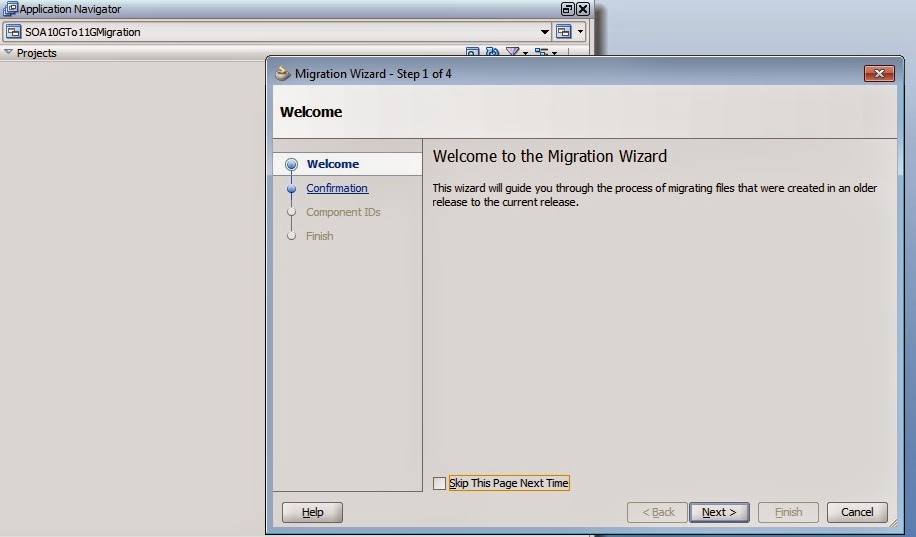
Step 3.) Now we can migrate BPELProcessA and BPELProcessB using JDeveloper, we simply open the SOA 10G process in 11G JDeveloper, as soon as we click on .jpr file the migration wizard pops up.


Step 4.) We can put the .xsd and .xsl files to proper xsd and xsl folder and make necessary changes in WSDL and .bpel file respectively, unnecessary output folder can be deleted as we have deploy folder instead.


Step 5.) Deploy this BPELProcessA composite to Weblogic server and repeat the same steps for BPELProcessB as well.

Step 6.) Now we have to migrate the dependent process BPELProcessC, if we see the bpel.xml file of this process we can see the WSDL URL's for BPELProcessA and BPELProcessB, we have to replace these 10G URL's with the new URL's (SOA 11G), once this is done repeat step 1-5


This completes the migration.

Post migration changes

1.) Change the location of .xsd and .xsl files to their respective folders

2.) If you were using preference in SOA 10G then in 11G it will be inside composite.xml file, you need to append bpel in the property name.

3.) Go to all the adapter and run the wizard to check if they are fine, if you find issues with the adapters better recreate them.

4.) In DB adapter we have requirements where we do logical delete in polling, however we want to update some other table or procedure from where we have polled from, below blog shows how this is done, if you have done this anywhere in your SOA 10G BPEL, its better to recreate the DB adapter fresh, as this has performance issues after migration.

http://shrikworld.blogspot.in/2011/05/customizing-delete-polling-strategy.html

5.) If you have used java activity inside your 10G BPEL we usually use import which refer to packages in SOA 10G, the package names have changed in SOA 11G. So you might need to change the package names.

6.) Go inside .xsl files and make sure the oracle-xsl-mapper part is changes to the new URL's or the xsd and you are able to open the xsl file in design view.