Friday, 13 January 2017

Adding authentication to your webservice in SOA Suite 11G

When you build a component which has an exposed service, you want to make sure that it is secure. This means we have to apply authentication and authorization to the service in question. Lets see how we can get this done in the SOA Suite 11G (PS2).
First of all we have already created a webservice which we are going to expose in my example an EventDispatcher which sends out events using the EDN.
Now lets say we want to secure this webservice using WS-Security, the username-token variant. The only thing we need to do is to right-click the service and choose: Configure WS Policies
In the next screen you can choose different policies for your webservice but the one we are looking for in under security. Click the green + sign at the Security tab and choose: oracle/wss_username_token_service_policy.
Click OK and check that your policy is selected in the Security section. If so, click OK. This policy will now make sure that if you send a ws-s header with your request, it will be processed. Adding this policy can also be done in the Enterprise Manager by the way. Select you component under SOA and select the Policies tab. Here you can do the same.
Now al we need to do is to make a user of which the credentials will be checked when he/she wants to make use of this service..
Go to your Weblogic administration console and click on Security Realms.
Next click in on ‘myrealm’ and click on the ‘Users and Groups’ tab. Click ‘New User’ and enter the information for the user you want to authenticate. Make sure your password if 8 characters long and contains at least 1 number.

Click OK if you are ready. The next thing is to create a group of which the user is a member. Select the ‘Groups’ tab and click ‘New’. Now insert the info of your group.
If your done, click on OK. You can now use this user to check if we have access to the service. In SoapUI you can create configurations which you can use to call a webservice. Make one for the user you have just created.
Now let’s try to call the service without a security configuration. It should look something like this.
Now select the Test configuration


and make the call again. You should now get a proper response from the server. This is the end of part 1 of this small tutorial…..authentication of a webservice in SOA Suite 11g using ws-security. In the next post, I will show you how you can make sure only users which are a member of the created group, can make use of the service.

Calling a webservice using the wss-username-token policy from a SOA Suite composite

When you are building a composite using the SOA Suite you quite often want to call an external webservice. These services can have a form of security on them….wss-username-token in our example. To attach the policy to the service in the SOA Suite is quite straight forward.
  • Right-click the service in the ‘External Reference’ swimlane and click ‘Configure WS Policies’
  • Choose the correct policy under Security. In my case oracle/wss_username_token_client_policy
  • Next we need to supply a username and password. The easiest way is to go to the source of the composite.xml and add 2 properties to the binding. See below for an example. This will ensure you can call your service using ws-security:username-token.
1
2
3
4
5
6
7
8
9
<reference name="CardManagementService" ui:wsdlLocation="v1.wsdl">
    <interface.wsdl interface="http://www.rbx.nl/wsdl/cardmanagement/service#wsdl.interface(CardManagementServicePortType)"/>
    <binding.ws port="http://www.rbx.nl/wsdl/cardmanagement/service#wsdl.endpoint(CardManagementServiceQSService/CardManagementServiceQSPort)"location="v1.wsdl" soapVersion="1.2">
        <wsp:PolicyReference URI="oracle/wss_username_token_client_policy" orawsp:category="security" orawsp:status="enabled"/>
        <property name="weblogic.wsee.wsat.transaction.flowOption" type="xs:string" many="false">WSDLDriven</property>
        <property name="oracle.webservices.auth.username" type="xs:string" many="false" override="may">MyUsername</property>
        <property name="oracle.webservices.auth.password" type="xs:string" many="false" override="may">MyPassword</property>
    </binding.ws>
</reference>

HTTP Basic authentication with SOA Suite 11g

There can be situations where you need to add some security like HTTP basic authentication to your Composite Services or References. Especially when you have some HTTP Binding Services or References. The HTTP Binding Service in SOA Suite 11g also has a SOAP endpoint beside the HTTP endpoint. With the SOAP endpoint you can always use WS-Security instead of the basic authentication, but if that was the case you won't choose for the HTTP Binding.     
For this blogpost I will use my http binding example of this blogpost 
In this example I have a Mediator with a HTTP Binding Reference. This reference has as endpoint the execute url of the Execute HTTP Binding Service, which is connected to the BPEL Component.
Select the execute Service and configure SOA WS Policies, Here you need to select the oracle/wss_http_token_service_policy . This OWSM policy enables HTTP Basic authentication for HTTP  & SOAP or WSS Username Token in SOAP.

For the Composite Reference you need to use the oracle/wss_http_token_client_policy. 

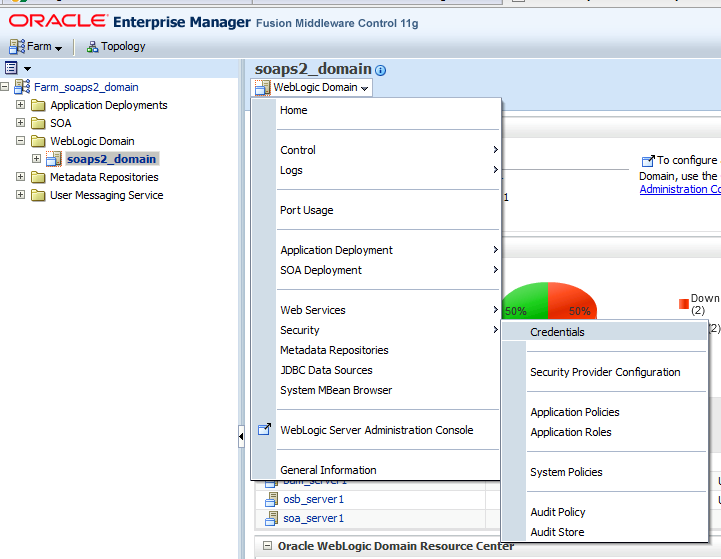
Off course you need to provide the username / password for the basic authentication.  To do this you need to go to the Enterprise Manager Application and select your WebLogic Domain. In the Menu, select the Security menu Item and then go to Credentials.

When you don't have the oracle.wsm.security Map then you need to create this. In the Map you need to add the basic credentials Key where you can provide the username / password for the HTTP Binding Service and Reference.
After rebooting the SOA Server you can test this HTTP Binding Service. I use Wfetch of Microsoft. The internal tester client of WebLogic and Enterprise is not so great with HTTP posts and security.

First test is a POST on the HTTP endpoint with a bad username.  This gives a HTTP 403 Forbidden. 
Now with a good username / password and for the POST I only have to provide the request in the body and without the SOAP envelop.

The HTTP Binding service also has a SOAP Endpoint. First we test this with a bad username.


Now with a good username / password. For the SOAP post you need to provide the Content-Type and SOAPAction HTTP Headers and the SOAP envelope with the request.

That's all.

Update by Maarten van Luijtelaar
You can have more than one account on the reference level by overriding the oracle/wss_http_token_client_policy properties. By default the value of csf-key is set to basic.credentials, but you can create a new key in EM and use that as an override.
Also, when not using the policy, adding the properties oracle.webservices.auth.username and oracle.webservices.auth.password with corresponding values will do the trick on external references.